Building a Construction Cost-Control ERP for a Solar Carport Contractor
A year-plus custom build for Baja Carports: project pipeline, sales, quote, material estimate vs actual cost, contract billing schedule, spreadsheet import/export, and the client-specific rules that a generic ERP could never handle. Screenshots, honest scope notes, and what the work actually looks like when the SOW meets the field.
Most "ERP for a small contractor" projects fail one of two ways. They either buy a generic ERP (SAP Business One, Odoo, NetSuite) and spend six months bending the workflow to fit software that was designed for a different industry, or they hire someone to build custom and end up with a fancy database frontend that everyone still ignores because their old spreadsheets do the job better.
We built one that people actually use.
This is a case study on Baja Carports, a US solar carport construction contractor. The system I'll describe below has been in active development for over a year — several months of prior work before I came on, then several months I've been actively on it — running their entire job pipeline: sales, quoting, material estimating, actual cost tracking against estimate, contract billing milestones, and the dozens of small workflow rules that only apply to their business.
Everything in the screenshots below is dummy test data (customer names like "customer w", contract amounts like $100k round numbers, dates that don't line up) so the visuals show the modules without any real client info.
What's in here
- The situation
- The pipeline
- The job record
- Contract billing schedule
- Labor billing, change orders, and document routing
- Material estimate vs actual cost
- Spreadsheet import and export
- The client-specific rules
- Why ERP work is never really "done"
- Tech stack
- What this costs
- Building something similar
The situation
Solar carport construction has a specific shape that generic ERPs handle badly. Each job is a discrete construction project with a long lifecycle — pre-contract, backlog waiting to start, job in progress, on hold if a permit or a payment stalls it, then completed. There's a physical site, a customer that might be an HOA or a commercial property or a public agency, a contract amount, a cost estimate, permits, agreements, prevailing-wage requirements in some states, pre-lien filings in others. Each stage has different people who own it — a sales agent lands the deal, an estimator prices it out, a project manager runs the build, an accounting team handles billing milestones.
Before the ERP, all of this lived in spreadsheets. Multiple spreadsheets. A pipeline spreadsheet the sales team updated, a materials spreadsheet the estimator kept, a billing spreadsheet the accounting team owned, and an email thread per job for everything that didn't fit anywhere else. Nobody had one place to look. Job status was whatever the last person who touched it remembered. New hires took months to onboard because the tribal knowledge lived in three heads.
The brief was straightforward: one system, everyone in the same view, no more "who has the latest version of the spreadsheet." The complication was that everyone had strong opinions about how their piece worked, and the workflow was deeply specific to this company's operation. Not "small contractor" specific — this contractor specific.
The pipeline
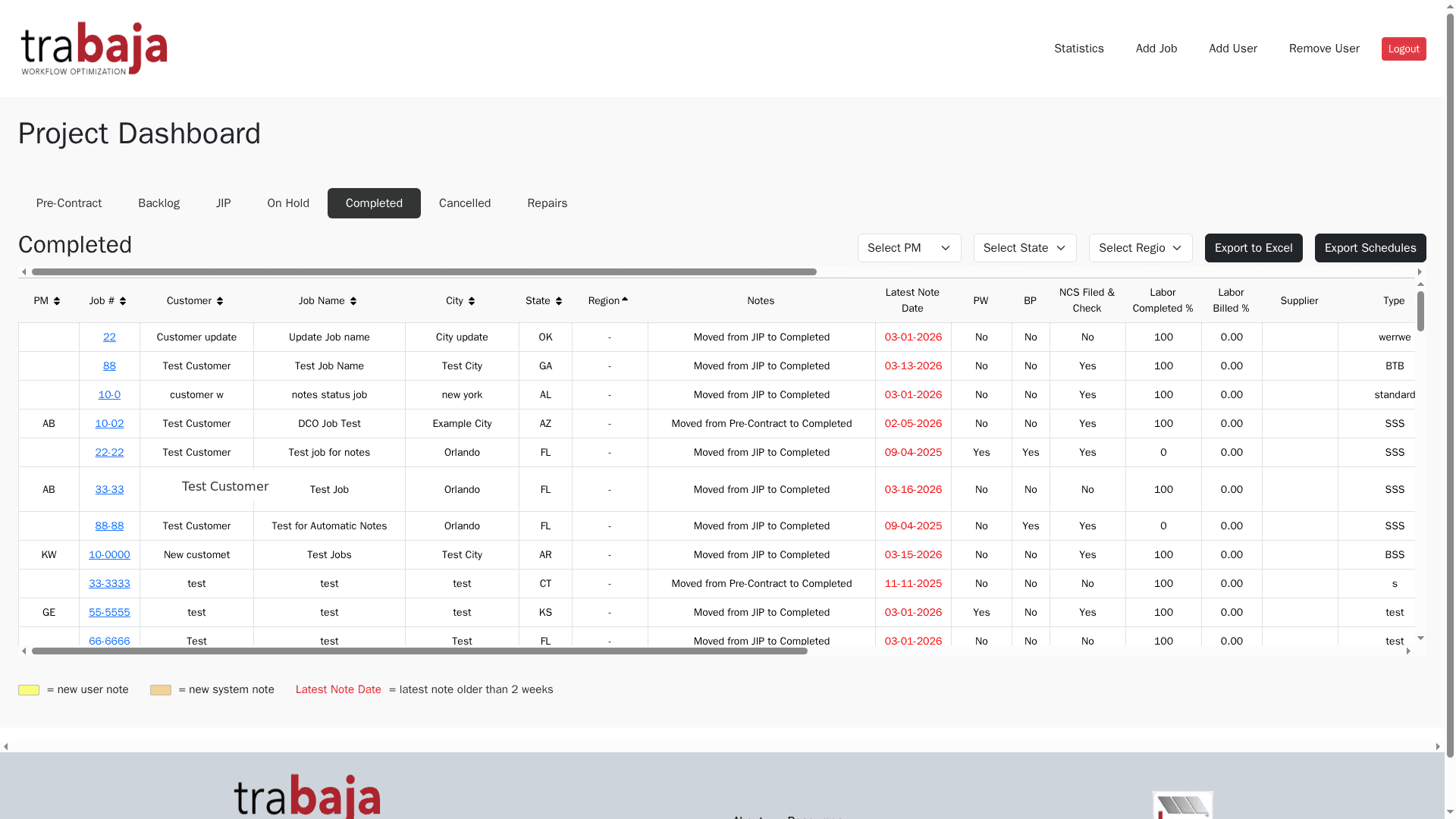
Here's what the project pipeline dashboard looks like:
Seven tabs across the top representing lifecycle states: Pre-Contract, Backlog, JP (Job In Progress), On Hold, Completed, Cancelled, Repairs. Each row is a job. Columns cover the pieces that matter at a glance — PM assignment, job number, customer, job name, city, state, region, access status, various status flags (NCS filed, verified, labor completed, labor billed), and the latest note date.
The filters across the top let you slice by PM, state, or region. Export to Excel is one click. Export Schedule is another — because the site plan for a construction crew needs to leave the ERP in a format the field team can print and hand out.
The seven-state lifecycle isn't from any textbook. It's what emerged after a year of running the business through the system:
- Pre-Contract — sales has landed a soft yes, the proposal is out, but the paperwork isn't signed. Notes live here so the sales team doesn't lose track of what was promised.
- Backlog — contract signed, materials being ordered, waiting for the field crew to be available. Some jobs sit here for weeks.
- JIP (Job In Progress) — physically being built. Costs are actively being tracked against the estimate.
- On Hold — usually a permit hold or a customer-side blocker. Distinct from Cancelled because On Hold jobs still have committed materials and expected revenue.
- Completed — build done, ready for final billing.
- Cancelled — dead. But not deleted, because we need the historical trail (and sometimes cancelled jobs come back a year later).
- Repairs — a completely separate track from new construction. Repair jobs have different billing, different material patterns, different PM workflows. They deserve their own tab so nobody accidentally treats a repair like a new build.
Every state transition writes a note to the job's audit log with a timestamp and the user who did it. So you can always answer "who moved this to Completed, and when?"
The job record
Click into any job and you get the full record:
Left column is Job Information — job number, name, customer, city and state, address, type (standard vs repair), square feet, spaces number, contract amount, cost estimate, shipping estimate, supplier, on-site vs ship, job status, region, PM assignment plus PM contact info, and a separate PMA (Project Management Assistant) block. There's a locked/unlocked toggle on the cost fields so only authorized roles can change financial data.
Right column has three sections:
Pre-Lien Information — pre-lien filings are a construction-industry thing (a legal notice preserving the contractor's right to file a mechanic's lien if they don't get paid). Tracked here per state's requirements: whether the data was received, whether it was sent to the pre-lien service, whether verification came back.
Agreement Information — was a formal Baja proposal generated, is prevailing wage required for this state/customer type, is the contract executed and signed. Simple yes/no flags that gate the workflow (a job can't move to Backlog until Executed = Yes).
Job Notes — the audit log. Every state transition, every manual note, every automated system event lands here with a date. In the screenshot you can see the state transitions logged for the test job: "Moved from JIP to Completed," "Job ready to be moved to Completed status," "Moved from Backlog to JIP," "New job created" — each with the exact date it happened. The Actions column lets an authorized user edit or delete a manual note; system-generated entries are immutable.
This audit pattern is the seed of what I'd extend into a full immutable event ledger for a bigger ERP (see my construction ERP proposal notes below on how that scales).
Contract billing schedule
Here's where the money actually moves:
Every contract gets a billing schedule broken into milestones. The screenshot shows a schedule with Down Payment 10% / $10,000 and Labor 40% / $40,000 as two of the tranches. Each row has:
- Payment Type — Down Payment, Labor, Materials, Retention Release, whatever the specific contract dictates
- Percentage — the % of contract this milestone represents
- Amount — the dollar figure (auto-calculated from % × contract, but overridable)
- Net Invoice — the invoice amount after any deductions or holdbacks
- Date — when it was invoiced (or when it's expected)
- Billed — yes/no, has this actually gone out
- Invoice # — the invoice number in the accounting system
- Locked — once billed and reconciled, this row locks so nobody can accidentally edit it
A Retention % field at the top lets you set contract-wide retention (common in construction — the customer holds back 5-10% until final acceptance to make sure the contractor comes back to fix punch-list items). The system automatically deducts retention from each milestone and tracks the total retention held so it can be released at closeout.
This is the piece that maps most directly to what a formal construction ERP would call the committed vs actual cost ledger. Each row is a committed billing tranche against the contract. As they get billed and paid, they become actuals. The delta between committed-but-unbilled and actual gives finance the remaining-commitment number they need to close each month.
Labor billing, change orders, and document routing
Contracts don't stay clean. Labor gets billed on its own schedule. Scope changes mid-build. Files pile up per job. Baja handles all three with parallel structures that reuse the billing-schedule primitive:
Three things in this shot, all on the same job record:
- Labor Billing Schedule — same column shape as the Contract Billing Schedule (Payment Type / % / Amount / Net Invoice / Date / Billed / Invoice # / Locked), but tracking the labor portion of the contract separately from the material portion. Retention % is set independently. Each row locks once billed.
- Change Orders Billing Schedule — a third parallel table for change-order billing, with its own retention and its own milestone rows. Empty on this test job, but structurally identical to Contract and Labor billing.
- Documents — file routing by document type: Accounting (with invoice attachments linked directly to the billing schedule — see the three "Invoice # i300" links pointing at the Job Invoices), ChangeOrders, Correspondence, EngineeringAndSite, FieldPOs (with a folder-per-PO structure), PrelienAndJointCheck. Each type has its own upload column and role-based permissions.
The change-order workflow itself opens a dedicated modal:
Change orders are the amendment mechanism for the contract — the equivalent of a PO amendment in a formal procurement chain. Each entry has a Change Order # and a dollar amount, links out to the Change Orders Billing Schedule for milestone-level billing, and files its own paperwork into the ChangeOrders document folder. Deliberately lightweight because Baja's contracting operation doesn't need a full three-way match. Structurally it demonstrates the amendment ledger pattern that a full construction ERP would extend into signed delta entries against a parent PO, with immutable audit trail.
The pattern to notice across all three tables (Contract, Labor, Change Orders): one schema, three uses. That reuse is what makes the system practical to maintain — a change to how billing schedules behave propagates to all three at once, without three separate implementations to keep in sync.
Material estimate vs actual cost
The Cost Estimate field on the job record isn't just a static number — it's the anchor for a separate materials workflow where the estimator can enter the itemized bill of materials (steel, panels, hardware, labor hours), and as materials get ordered and delivered, the actual cost accrues against that estimate.
The lock/unlock on Cost Estimate is deliberate: once the estimator finalizes the estimate and the contract is signed, the field locks. Nobody can edit it without an admin unlock. This preserves the baseline for the variance calculation — Actual Cost vs Locked Estimate = variance dollars, and variance dollars is one of the numbers the executive team watches.
The materials module was one of the pieces that took the most iteration. The estimators wanted to import material lists from their existing spreadsheet templates (which had accumulated years of formula tweaks and format conventions). Rather than force them to re-enter, we built the importer to accept the exact XLSX shapes they were already using — column headers, unit conversions, sub-item groupings and all.
Spreadsheet import and export
Every module has an Excel/CSV import and export button. This sounds mundane. It's actually the single most-used feature.
The reason is that a mid-sized construction operation has decades of accumulated data in spreadsheets. Old jobs, old material lists, old pricing sheets, old contracts. The ERP couldn't require that all of that history be manually re-entered — nobody would have used it. So imports were built for:
- Pipeline import — bulk-add jobs from a legacy spreadsheet, with column mapping so old header conventions get translated to the new schema
- Material list import — upload the estimator's XLSX and it becomes an itemized BOM on the job
- Billing schedule import — for jobs migrated from the legacy system, drop in the existing milestone schedule
- Cost actual import — the accounting team's monthly export from QuickBooks lands as actual-cost entries against the right jobs
And exports mirror all of the above. Export Schedule and Export to Excel buttons are visible on the pipeline dashboard because the field crews and the accounting team still want printable PDFs and offline spreadsheets. The ERP is the source of truth; the exports are for the people who need to work outside of it.
The client-specific rules
The parts of the system that made it this contractor's system rather than a generic construction ERP are the rules embedded in the workflow. A few examples:
- JIP Status flag — a job can be in "Backlog" status but flagged as JIP Ready, meaning the crew is scheduled and materials are staged, so it's really about to move. Their PMs asked for this because "waiting for materials" and "waiting for the calendar to line up" look identical in the pipeline otherwise, and they need different attention.
- Regional PM routing — jobs default to a PM based on the job's region (Arizona / Nevada / NorCal / SoCal / Other). New jobs in NorCal automatically get assigned to the NorCal PM unless a specific PM is chosen. Saves clicks and prevents the "who owns this?" gap.
- Prevailing wage flag drives the labor line calculation — if Prevailing Wage = Yes on the Agreement Info, the labor cost estimate uses a different rate table than standard commercial jobs. This one flag propagates through material estimation, billing schedule, and reporting.
- Repair jobs skip the pre-lien and prevailing wage sections entirely. Repair work doesn't need those, and cluttering the form with irrelevant fields was one of the earliest usability complaints. Now the Type = Repair Job checkbox collapses those sections.
- Custom PM contact block per job — because sometimes a specific job needs a different phone/email than the PM's default (subbed to a different superintendent, using a personal cell for after-hours). The PMA (Project Management Assistant) block below the PM block handles this.
- Executive dashboard filters — the founder wanted a specific view: all jobs with cost variance > $5,000 or on hold > 30 days, sortable by contract amount. Not a general "reports" module, one specific view that answers the one specific question he asks every Monday morning.
None of these were in the original SOW. Every one of them came out of the system being used, someone hitting a friction point, and me adding the rule. This is what "ongoing refinement" actually means in ERP work.
Why ERP work is never really "done"
Here's the honest part of the case study.
The technical patterns in an ERP are well-trodden. Workflow state machines, role-based access, immutable audit logs, commitment vs actual accounting, spreadsheet import/export — these have textbook implementations. If the only variable was code, an experienced developer could scope, build, and hand over a small-contractor ERP in three or four months, fixed price.
The variable is not code. The variable is how the finance director actually wants the report to look, and which of the four different meanings of "job status" the sales team uses on any given call, and the fact that the estimator's spreadsheet template has a merged cell in column F that breaks the naive importer, and the new state law that just changed the pre-lien deadline from 30 days to 20.
An ERP settles into a business the way water settles into a container. Slowly, and by finding every gap in the walls. The build isn't the end — it's the beginning of a multi-year working relationship where you make small changes constantly as the business teaches you what it actually needs.
Baja's system is a year-plus in and I still make weekly tweaks. That's not a scope failure. That's a healthy ERP.
Tech stack
- Frontend: Next.js (React), Bootstrap-based UI
- Backend: Node.js API
- Database: SQL (project data, users, audit log, materials)
- Hosting: DigitalOcean App Platform
- Auth: username/password with role-based access (admin, PM, sales, estimator, accounting, read-only)
- File processing: XLSX and CSV import/export via native libraries
- Deployment: git push to main triggers rebuild and deploy
Nothing exotic. The point of the stack was to keep it maintainable — anyone with mid-level Node/React skills should be able to pick this codebase up and continue. Fancy tech doesn't help a business that needs their ERP to keep working while their IT budget stays modest.
What this costs
This is the question I get asked most, and there isn't a single number that answers it honestly, but here's the range:
A build like Baja's has cost meaningfully over $10,000 to reach production and cover the sales/quote/pipeline/materials/billing modules — that's the price of getting it right the first time, with real reliability, real audit trails, and workflow that actually matches the business.
For a construction ERP with more modules (BOQ, procurement, RFQ, supplier comparison, multi-company, bilingual, ZATCA-style e-invoicing, deeper reporting), a realistic Phase 1 sits meaningfully north of that. I'd want to review the specific SOW before quoting.
Ongoing refinement is a separate line — figure a monthly retainer or an hourly bucket for the constant stream of small changes that any ERP requires as the business uses it. Budget for this from day one, because it's part of owning the system, not a scope failure.
Building something similar
If you're a contractor, a construction firm, or any operator whose business runs on complex jobs with long lifecycles and lots of role-specific views, this pattern will work for you. The lifecycle states will be different. The billing structure will be different. The audit trail requirements will be different. The core spine — pipeline, job record, commitment vs actual, audit log, imports/exports, custom rules — is reusable.
The best way to figure out if it's worth building is to talk about your current spreadsheet mess for 30 minutes and see what falls out. Start with a paid $200 Discovery: send me your current process notes and any sample spreadsheets, and I'll come back with a written breakdown of what the modules would be, a real Phase 1 quote, and a timeline. The $200 credits toward the build if you award.
Get in touch or book time to talk through your operation.
Need Help With Your Website?
I fix these problems every day. Send me a message and I'll take a look.
Get Help Now